
Clans with seasons
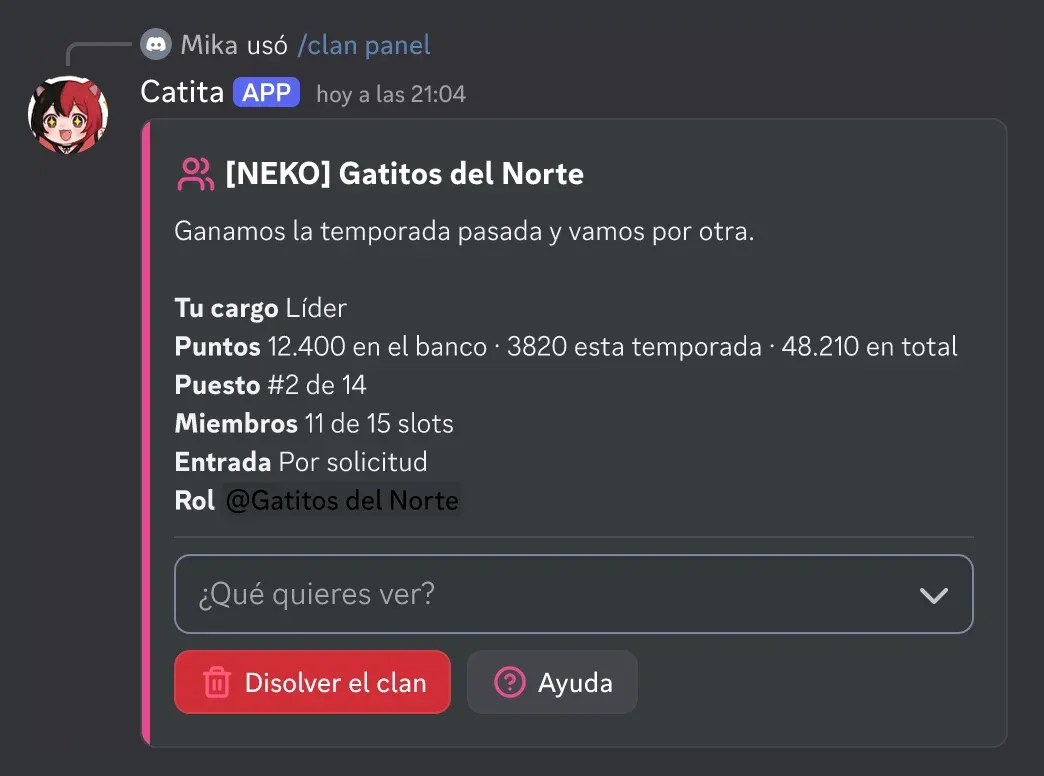
Clans are groups with their own role in the server. They earn points from their members’ activity, spend them on upgrading their role and compete on a seasonal leaderboard. Use them with /clan and configure them in /settings > Clans.
Creating and joining
Section titled “Creating and joining”/clan createwith a name (it is also the role’s name) and a tag of 2 to 5 letters or numbers.- Who can create one: anyone, certain roles or only server managers. It can cost coins from the economy.
- Join modes: invitation (always), open or by request; each clan picks among the ones the server allows.
- Ranks: leader, co-leaders and members, with slots and a waiting time to switch clans.
/clan panelopens the clan panel with members, requests, invites, profile, internal labels and shop.
Points
Section titled “Points”Members earn points with messages, voice and reactions, with cooldowns, a minimum length, a daily cap per member and channel and role filters. Each point goes to three balances: the bank (to spend), the season (for the leaderboard) and the total. Staff can give or take points with /clan points.
Clan shop
Section titled “Clan shop”With bank points, the clan upgrades its role: name, tag, color, gradient, holographic, icon, banner, more slots, text channel, voice channel and boost. The server sets the prices (0 = not for sale).
Roles and seasons
Section titled “Roles and seasons”- Clan roles are created below a master role and sorted by the season leaderboard.
- When each season ends, the history is saved, the podium is announced, the winner gets the champion role and the top 3 their prizes.
/clan topshows the season, all-time or historical leaderboard.
Commands: clans reference.
Catita is a project by Random Dev, a development studio owned by ZENU GROUP LLC. catita.gg