
Music
/play plays a song, link or playlist in your voice channel. It searches YouTube, YouTube Music, Spotify, Apple Music, SoundCloud and Deezer.
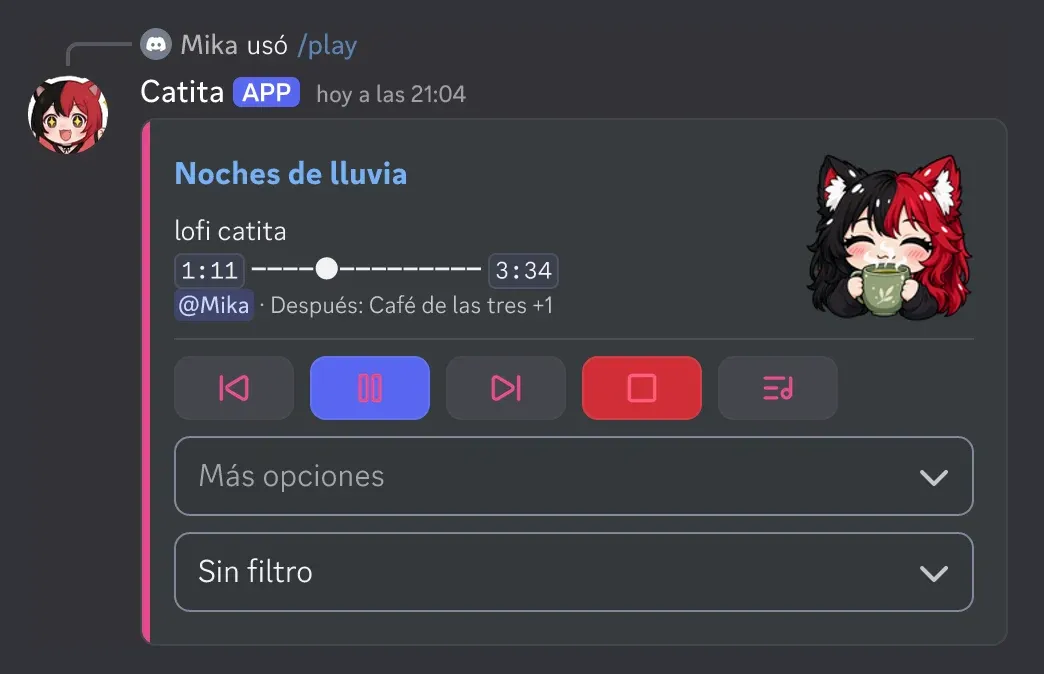
The panel
Section titled “The panel”The now-playing message updates on its own and carries the controls: previous, pause, skip, stop and queue, plus a menu with repeat, volume, lyrics, autoplay and 24/7, and another with the filters: bass boost (soft, normal and strong), nightcore, vaporwave, 8D, karaoke, tremolo, soft, slow, fast, pop and rock.
What it does
Section titled “What it does”- Queue with skip, move, remove, shuffle and jump to a position.
- Repeat song or queue, seek to a moment and volume from 0 to 150.
- Lyrics of the current song.
- Autoplay: keeps playing similar songs when the queue ends.
- 24/7: stays in voice even when it empties (if the server allows it).
- Your own playlists: save the queue, play them, rename them and share them with a code (
/playlist).
Who’s in charge
Section titled “Who’s in charge”Whoever requested a song can pause and skip it. Everything else is for the DJ role, staff, the owner of a temporary voice channel or whoever is alone with the bot. Everyone else can vote to skip. In /settings > Music you pick the DJ role, the panel channel, the starting volume, the vote percentage and the per-person song limit.
Commands: music reference.
Catita is a project by Random Dev, a development studio owned by ZENU GROUP LLC. catita.gg