
Temporary voice channels
When you join a “Join to create” channel (a hub), Catita creates a voice channel for you and deletes it once it’s empty. Set it up with /voicemaster setup or in /settings > Temp voice.
The hub
Section titled “The hub”- Name template with
{user},{game}(the game you are playing) and{count}. - Member limit, audio quality and private channels (they start locked).
- Cooldown between channels for the same person.
The channel panel
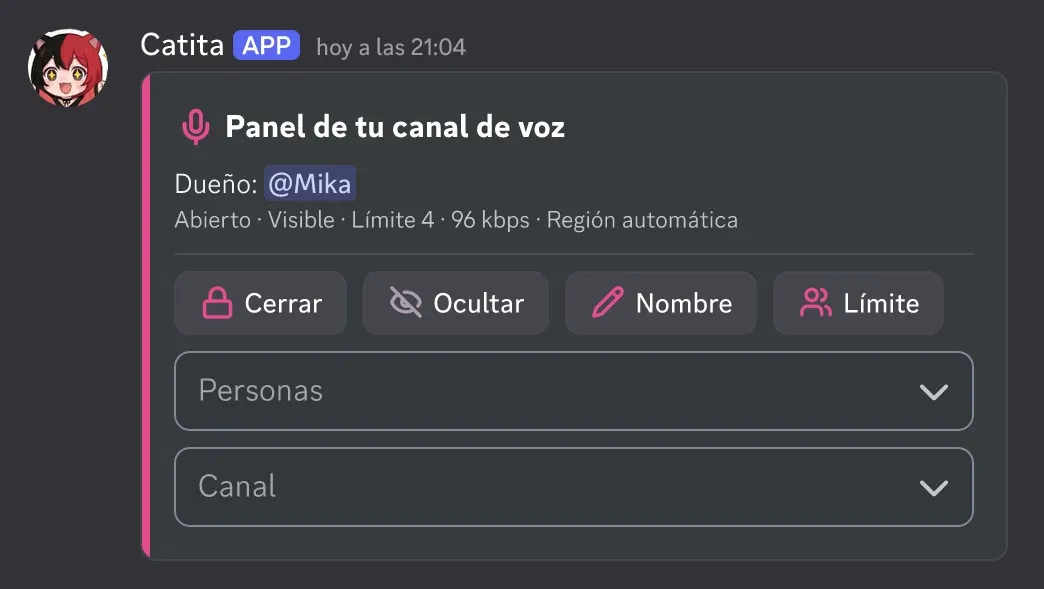
Section titled “The channel panel”Buttons to lock or unlock, hide or show, name and limit, and menus for:
- People: permit, block, kick, hand over the channel or claim it if its owner left.
- Channel: audio quality, region, a one-hour invite and information.
Catita remembers your preferences for your next channels; /voice reset forgets them. Everything also exists as a command: /voice lock, /voice permit…
Commands: voice reference.
Catita is a project by Random Dev, a development studio owned by ZENU GROUP LLC. catita.gg